Branding
Custom Logo Leather Laptop Sleeves: 8 Branding Options Explained
By the India Leather Manufacturer production teamUpdated 17 min read
Quick answer
On leather laptop sleeves the methods that actually work are blind deboss, hot-foil stamping, laser engraving, metal logo plate, marked hardware, woven or printed label, screen or pad print and printed lining or inside stamp. The mark normally sits on the front face, centred or bottom-right. A deboss is the most durable because the mark is the leather itself; a metal plate carries the most perceived value and the most tooling; laser needs no die and is the only practical route for per-piece personalisation.
Key takeaways
- The position comes first: on leather laptop sleeves the pattern decides where a mark can go, and that is the front face, centred or bottom-right.
- A deboss and a foil share one brass die, so a blind mark and a gold mark cost one piece of tooling.
- Foil, print and plates sit on the surface; a deboss and a laser mark are in the material. Match the method to where it will rub.
- Vector artwork with fonts outlined, at final size, minimum line weight about 0.5 mm — or the die cannot be cut.
- Nothing is branded in bulk until you approve a strike-off on your actual article and colour.
- Tooling is one-time and kept on record, so repeat orders start at cutting.
Where a logo can physically go on a laptop sleeve
Branding is a pattern decision before it is a marketing one. On leather laptop sleeves the default position is the front face, centred or bottom-right, and that is not an aesthetic preference — it is where the pattern gives us a flat, supported area of the right size, reached before the piece is assembled. Everything else on this page follows from that.
Mark the position and the finished width of the logo in millimetres on your tech pack. "Centred" and "discreet" are not positions; a factory that is left to decide will put the mark where it is easiest to reach, and you will discover where that was when the sample lands.
The front face, bottom-right
A large flat rectangle with nothing else on it — one of the easiest surfaces we brand, and the mark can be generous.
The front face, centred
Suits a symmetrical wordmark, and it is the position that photographs best on a listing image.
A pull tab or the zip puller
A branded pull is the detail that distinguishes a sleeve on a shelf full of plain ones.
The interior felt or microfibre
Visible every time the machine comes out, and it is the surface the customer touches most.
Every branding method, and what each one does on a laptop sleeve
We run seven methods on leather plus printed linings, and all eight can appear on one order. The table is the honest version: what each one suits on this particular product, what it needs from your artwork, what tooling it carries, and how it wears.
Read the durability column against where the mark will sit. A method that is perfect on a protected panel is the wrong choice 20 mm away on an edge that rubs, which is why we ask for the position before we recommend a method.
| Method | What it suits on leather laptop sleeves | Artwork & tooling | How it wears |
|---|---|---|---|
| Blind deboss | Possible, but the area is small and often curved. The mark has to sit on the one genuinely flat part of the pattern, struck before the leather is wrapped. | Vector, single colour, fonts outlined, minimum line weight about 0.5 mm at final size. One brass die per mark per size, made once. | The most durable method there is — the mark is a compression of the leather itself, so there is no layer to wear off. |
| Hot-foil stamping | Good contrast on a small dark face. Avoid the wrap radius, where foil stretches and breaks up. | The same vector file and the same brass die as a deboss, plus a foil colour reference. A deboss and a foil can share one die. | Good, but the foil is a film sitting on the surface. It abrades wherever a thumb, a strap edge or a buckle rubs it. |
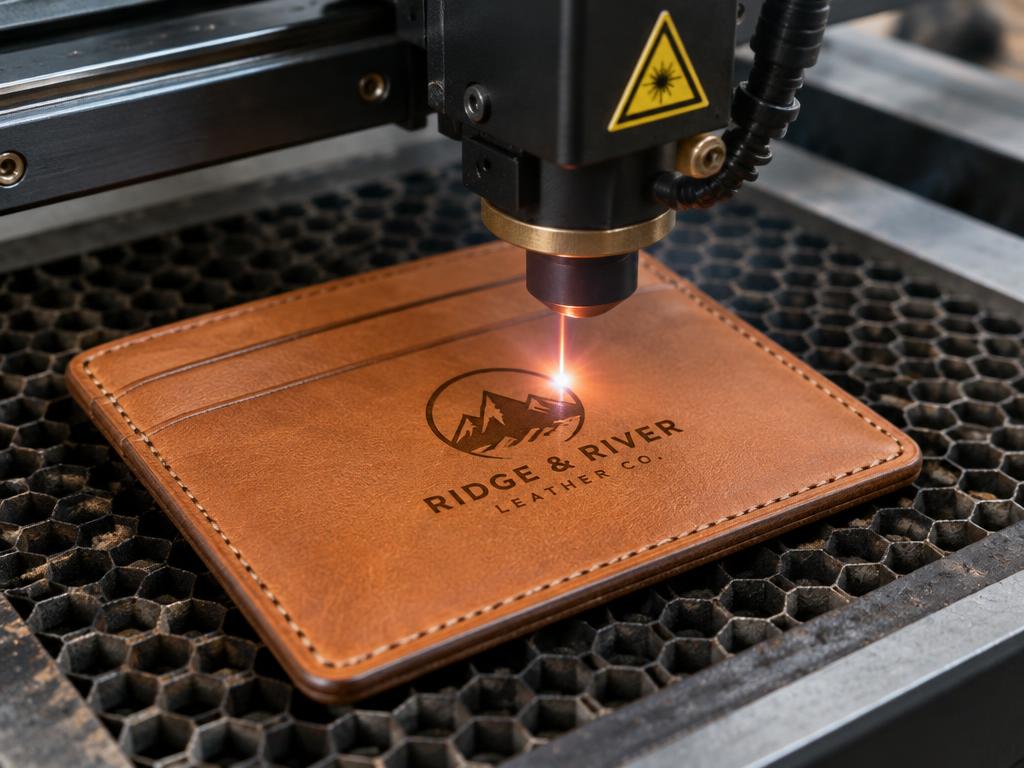
| Laser engraving | Usually the most practical method on a case — no die, fine detail, and it copes with the small areas these patterns leave you. | Vector preferred, and it holds far finer detail than a die. No tooling at all, so variable data and per-piece names cost no extra die. | Permanent, but tone depends on the finish: controllable on vegetable-tanned leather and PU, unpredictable on heavily pigmented, oily or waxy leather. |
| Metal logo plate | Works on a rigid lid or a padded face. On a wrapped shell it adds thickness exactly where the case has to stay slim. | Vector artwork plus its own etch or casting tooling, so the first lead time is longer and there is a real minimum. | Excellent, provided it is riveted, screwed or stitched. A glued-only plate is the most common branding failure we are asked to fix. |
| Marked hardware | Marked zip pullers on a zip case, or an etched stud or frame on a hard shell. | Laser-marking or etching stock hardware is the low-minimum route. A cast part carrying your logo needs mould tooling and a much higher minimum. | As durable as the plating. A laser mark on plating can polish back over years of handling; a cast or struck mark cannot. |
| Woven or printed label | A heat-seal or sewn label inside the lid, which is also where model and composition wording usually goes. | Artwork goes to the label mill, whose minimum applies rather than ours. Woven damask or satin, printed satin, or a sew-on leather patch. | Long-lived if stitched in rather than heat-sealed, and it carries composition, care and origin wording at the same time. |
| Screen or pad print | Pad print reaches the curved and recessed areas a flat die cannot, which is why so many hard cases are printed rather than stamped. | Vector per colour. Screen print suits large flat areas; pad print reaches curved and recessed surfaces a flat die cannot touch. | Moderate. Opaque ink is the only way to get solid white or a bright colour onto dark leather, but it can crack at a fold — check flex on the strike-off. |
| Printed lining or inside stamp | An inside stamp or printed lining, often carrying the device or model code alongside the logo. | Artwork to the lining printer, or a small brass die for an inside stamp. Printed linings start from moderate quantities upward. | Protected by its position, so it outlasts most exterior marks. Useful as a second mark, a style code or an anti-counterfeiting detail. |
The method we would recommend for leather laptop sleeves
A laptop sleeve is a large flat rectangle, which makes it one of the easiest things we brand. Blind deboss, bottom-right or centred, on the front face before the foam and lining are built in.
Nothing about that is fixed. Send the artwork, the leather or PU article and the colour, and we will say which methods will work at the size you want and which will not — including the ones we would talk you out of. That conversation is free and it is considerably cheaper than a rejected strike-off.
Blind deboss and hot foil: two marks, one brass die
These two are usually presented as alternatives, which obscures the useful fact that they are the same press, the same die and the same set-up — the foil is simply a film fed between the die and the leather. Specify both at the start and the second one costs very little.
What a deboss needs from the leather
A deboss is a compression of the leather, so the substance has to be there to compress. On leather laptop sleeves we typically work at 1.2–1.6 mm (3–4 oz) face leather over 3–5 mm foam, or unpadded for a slim slip sleeve. Vegetable-tanned, full-grain and milled articles from roughly 1.2 mm up hold the crispest impression; soft, loose, heavily grained and very thin leathers take it faintly at best.
Artwork needs a minimum line weight of roughly 0.5 mm at final size. Hairlines and small reversed-out text fill in, because the leather closes around the die rather than holding a knife edge.
When foil earns its place
Foil is the only way to get a legible mark at a distance on a dark or black article, and that is most of what it is for. It is a film sitting on the surface, so it abrades where the product is handled, rubbed or folded.
On leather laptop sleeves the rule is simple: use foil where you need contrast and the surface is protected, and use a blind deboss anywhere a thumb, a strap or a buckle passes over the mark.
Laser engraving, metal plates and marked hardware
If a deboss is the default, these three are the reasons to leave it. Each solves a problem a die cannot: fine detail, perceived value, or putting the mark on metal rather than on leather.
Laser engraving — no tooling, variable data
A laser needs no die at all, so artwork goes straight to the machine and every piece can carry a different name, initial, number or date at no extra tooling cost. That is why corporate gifting and personalisation programmes run on it.
The trade-off is predictability. Tone is controllable on vegetable-tanned leather and on PU, and uneven on heavily pigmented, oily or waxy articles, where it can burn pale or scorch. We always strike off first.
Metal logo plate — the most perceived value, the most tooling
An etched or die-struck brass or zinc plate carries more perceived value than any other method. It also needs its own etch or mould tooling, which means a longer first lead time and a real minimum.
Fix the fixing on the tech pack: riveted from behind, screwed, or stitched through a reinforcement. A plate that is only glued will lift at a corner, and no amount of logo quality survives that.
Marked hardware — your logo on the metal
The hardware we normally specify on leather laptop sleeves is concealed magnets, press studs, elastic, hinges and zips; nickel-free plating on request where a part sits against skin. Laser-marking or etching those stock parts is the low-minimum route and is available on almost any order.
Casting your own hardware from a custom mould gives a far better result and carries mould tooling, a much higher minimum and a longer first lead time. It is worth it on a long-running range and rarely on a first order.
Labels, linings and packaging — the marks buyers forget
The lining on leather laptop sleeves is typically soft microfibre or felt against the machine; wool felt is a common choice for an unpadded sleeve. That is a branding surface, and it is the cheapest one you own because it consumes no face leather and no exterior real estate.
Packing is normally poly bag with a silica sachet, then a printed sleeve or box; retail hang-tab or hook-ready packs on request. A branded box, sleeve, dust bag, tissue, swing tag and care card can all be made to your brand guidelines and are quoted alongside the product.
- Woven damask or satin labels, printed satin, or a sew-on leather patch — stitched in rather than heat-sealed wherever the product allows.
- Composition, care and origin wording, which several markets expect and which a label can carry at the same time as your name.
- A printed or jacquard lining from moderate quantities upward, or a small inside stamp at any quantity.
- Swing tags and care cards, which carry a barcode and retail price as well as the logo.
- Outer packaging — box, sleeve, dust bag, tissue — bearing in mind print has its own minimum and lead time, usually longer than the leather.
Why the label is usually two jobs, not one
Buyers for leather laptop sleeves are typically tech brands, corporate IT gifting and office-supply retailers, and for all three the sewn-in label has to carry composition, care and country-of-origin wording as well as the brand name. Specifying it as a branding item and then discovering it also has to be a compliance item is how a shipment gets held at a label, which is an expensive way to learn the difference.
Get the wording confirmed at sample approval. Label mills carry their own minimums and their own lead times, and on a first order the label is more likely to be the critical path than the leather is.
How genuine leather and PU take the same mark differently
Most leather laptop sleeves we make are genuine leather, but the same programme often runs a PU version at a lower price point, and the branding does not transfer between them. Leather is a natural, variable, absorbent substrate; PU is a consistent coated one. The same artwork needs different settings, and sometimes a different method.
- Deboss on full-grain or vegetable-tanned leather: the deepest, crispest mark available, and it darkens attractively with the leather around it.
- Deboss on PU: repeatable and clean, but shallower. A deep strike can craze the coating at the edge of the impression, so an embossed-grain PU holds it better than a smooth one.
- Foil on leather: good contrast, slight variation hide to hide. Foil on PU: very even, and the usual choice on dark PU.
- Laser on vegetable-tanned leather and on PU: controllable. Laser on heavily pigmented, oily or waxy leather: unpredictable, and the reason we strike off.
- Screen and pad print: well behaved on PU and pigmented leather, riskier on soft or stretchy articles where ink can crack at a fold.
- A die setting proven on one material is never carried across to the other. Each article gets its own strike-off.
What your artwork has to be before we can cut a die
Almost every branding delay we see is a logo that arrived as a JPEG the week production was due to start. Send the artwork on day one and branding runs in parallel with sampling, costing you nothing in lead time.
We will measure the thinnest line in your file and tell you whether it holds at the size you want. A monogram usually needs about 8–10 mm of width to stay legible on leather and a wordmark considerably more; on leather laptop sleeves the available area often decides the size before taste does.
- Vector artwork — AI, EPS, PDF or SVG — with fonts outlined, so nothing reflows on our machines.
- Single colour for a deboss or a foil; one file per colour for a print.
- Supplied at the final size you want it struck, not scaled to fit a page.
- A foil colour reference, or confirmation that the mark is a blind deboss.
- Confirmation that you hold or are licensed to use the artwork — we do not carry out trademark clearance.
- Which surfaces the mark goes on: leather, lining, hardware, tag or packaging.
The size is set by the pattern, not by your brand guidelines
We will also tell you the largest size that works, and on leather laptop sleeves that is decided by the pattern rather than by taste. The mark sits on the front face, centred or bottom-right, and the usable area there is fixed by the construction — so the brand guideline that says the logo is never reproduced below a certain width sometimes has to lose that argument.
If it does, the usual answer is a simplified lock-up: the symbol alone, or the wordmark alone, cut as a second die at the smaller size. That is a design decision worth making deliberately rather than discovering on a strike-off card.
Strike-offs: why you approve a physical mark, not a mock-up
A strike-off is your logo struck on the actual article and colour you have chosen, at a couple of pressures and temperatures, so you can see depth and contrast instead of imagining them. Nothing is branded in bulk until you have approved one.
You pick the strike you want and we record the settings — die, size, position, pressure and temperature — against your logo, so the result is repeatable on a reorder two years later. Laser skips the tooling step and goes straight to a strike-off.
On leather laptop sleeves we strike off on the actual panel in the position you have specified rather than on an offcut, because on a laptop sleeve the surrounding construction changes how the mark sits — what is behind the leather at the moment of the strike decides how deep and how even the impression is.
Expect close, not identical. No two hides take heat, pressure or laser energy in exactly the same way, and vegetable-tanned and pull-up articles vary most. The strike-off sets the standard; what varies is tone and depth inside the range it showed you.
Tooling, repeat orders and what actually drives the cost
A brass die is engraved for one mark at one size and kept on record with its settings, so repeat orders — and other products in your range carrying the mark at that size — need no new tooling. A size change or a logo redesign means a new die. Die cost is one-time and quoted with the first order.
Branding follows the product MOQ rather than carrying one of its own: 200 pieces per design for leather laptop sleeves. The exception is where the branding is the product — leather patches start at 500 pieces, and woven labels carry the label mill's minimum rather than ours.
- Number of methods on the piece — each one is a separate operation and a separate in-line check.
- Number of surfaces — leather, lining, hardware, tag and box are five set-ups, not one.
- Number of distinct marks and sizes, because each size is its own die.
- Per-piece personalisation, which adds handling time rather than production time and has a practical ceiling per run.
- Whether the mark can be applied to a flat panel before assembly, which is faster and cleaner than branding a finished article.
- Packaging print, which usually has a higher minimum and a longer lead time than anything we do in leather.
Ready to start your order?
Send your brief and get a quotation and sampling plan within one working day.